Product area
Plan the day. Keep your team in view.
A shift is open, a leave request arrives and hours still need recording. Staff & time brings scheduling, absences, working time and staff details into one shared workspace.
What you can do with it
Scheduling
Functions and example
Match schedules to actual shift requirements and identify the effect of absences early.
Functions
- Preferred rota
- Include staff preferences in planning.
- Absences
- Compare leave, sickness and training with the available team.
- Planned and actual
- Compare shift requirements, planned staffing and working time.
- Planning analysis
- Use rule-based notices and analysis for professional review of the schedule.
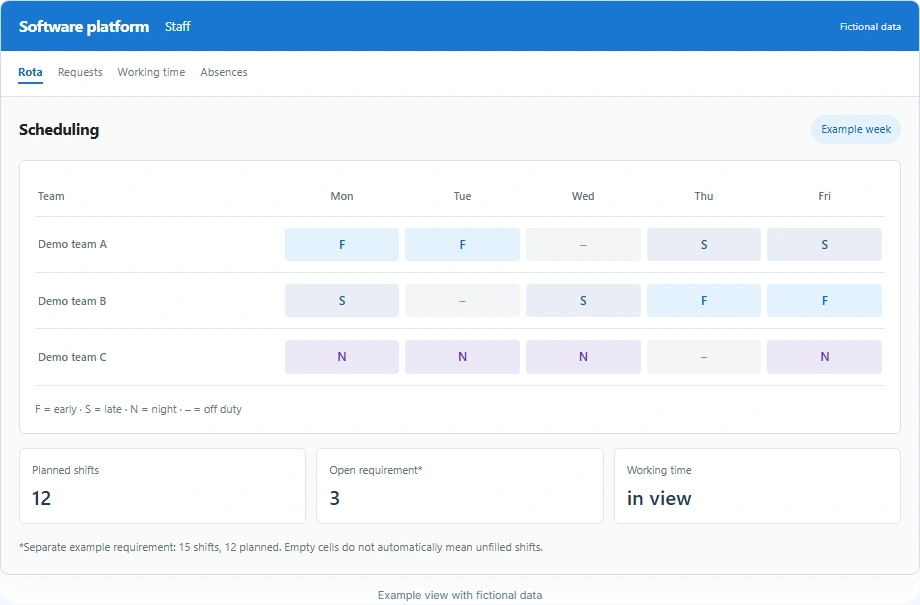
An absence changes the available staffing. Requirements, preferences and existing assignments are checked and the schedule is adjusted.
View product illustration with fictional data
Scheduling
Example week| Team | Mon | Tue | Wed | Thu | Fri |
|---|---|---|---|---|---|
| Demo team A | F | F | – | S | S |
| Demo team B | S | – | S | F | F |
| Demo team C | N | N | N | – | N |
*Separate example requirement: 15 shifts, 12 planned. Empty cells do not automatically mean unfilled shifts.
Example view with fictional data
Staff management & staff records
Functions and example
Organise staff records, contracts, correspondence and reporting in a shared working environment.
Functions
- Staff record
- Bring relevant information about the person together in one place.
- Contracts
- Manage staff contracts and related details.
- Staff correspondence
- Prepare letters using templates and editable AI drafts.
- Staff reporting
- Analyse information for team and staff organisation.
Staff information, contracts and related correspondence are reviewed in the record and analysed where needed.
View product illustration with fictional data
| Area | Information |
|---|---|
| Contract | Part-time · 30 hours/week |
| Documents | Contract documents & agreements |
| Correspondence | Template → draft → review |
| Analysis | Working time & staff overview |
Go directly from staff information to the related document.
Example view with fictional data
Working time & attendance
Functions and example
Record starts, finishes and breaks. Make attendance and hours worked traceable for staff and managers.
Functions
- Clock in and out
- Document the start and end of work and breaks.
- Time-entry origin
- The connection associated with a time entry is logged server-side using the IP address.
- Hours & attendance
- Review the daily overview, working-time account and attendance.
- Staff reports
- Prepare time records and analysis for each staff member.
Starts, breaks and finishes are recorded; hours are reviewed in the time account and prepared for a report.
View product illustration with fictional data
Clock in12:00
Break12:30
Continue16:00
Clock out
Example time entry · IP origin logged server-side
Example view with fictional data
Your next step
The right building blocks for your daily work.
The functions build on Smart AI Core. Together we clarify which you need, what needs adapting and which operating approach fits. This becomes the concrete scope of your offer.
Discuss your task ↗View offer & operation ↗