Product area
Resolve questions. Put results to work.
Ask questions about extensive documents, develop drafts and edit structured results in SmartView. Files and documents provide the foundation; AI assistants and semantic search help you explore their content.
What you can do with it
AI assistants for tasks
Functions and example
Ask a question, review a draft and reuse the result. AI assistants connect tasks, projects and notes with relevant information.
Functions
- AI assistants for questions and tasks
- Work with a general-purpose assistant or one configured for the task.
- Memories
- Save important information and bring it back into conversations as context.
- Projects
- Organise related AI conversations in projects.
- Notes
- Record results and continue editing voice or text notes.
- Export & SmartView
- Export conversations and open structured results alongside them.
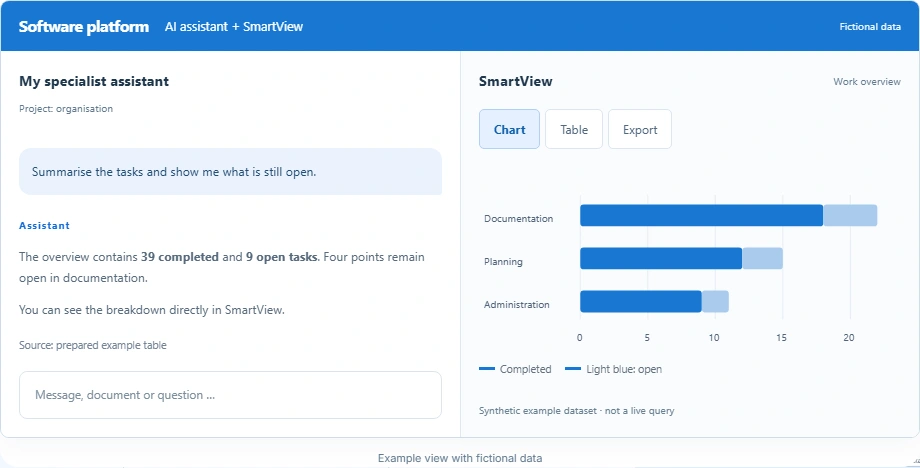
A question is explored with the appropriate assistant. Related conversations and notes remain in the project; structured results can then be opened.
View product illustration with fictional data
The overview contains 39 completed and 9 open tasks. Four points remain open in documentation.
You can see the breakdown directly in SmartView.
Source: prepared example table| Area | Completed | Open |
|---|---|---|
| Documentation | 18 | 4 |
| Planning | 12 | 3 |
| Administration | 9 | 2 |
One table.
Or all of them together.
Export options in the product. This website only shows a preview.
Synthetic example dataset · not a live query
Example view with fictional data
Tables, charts & export
Functions and example
A table makes a result clear. Check figures, view a suitable chart and export the data for further work.
Functions
- Available in the AI workspace
- The conversation and structured result remain side by side.
- Interactive charts
- View numeric tables as bar, pie or line charts and update them when values change.
- Edit tables
- Check data, make changes and switch between result versions.
- Complete export
- Export one table or all tables to Excel, Word or PDF; CSV supports data exchange.
A table from the conversation is opened, edited where needed and viewed as an appropriate chart.
View product illustration with fictional data
| Area | Completed | Open |
|---|---|---|
| Documentation | 18 | 4 |
| Planning | 12 | 3 |
| Administration | 9 | 2 |
One table.
Or all of them together.
Export options in the product. This website only shows a preview.
Synthetic example dataset · not a live query
Example view with fictional data
Files & documents
Functions and example
Provide files and documents for everyday work. Document analysis and semantic search complement working with their content.
Functions
- Provide files
- Make manuals, processes and documents available in a structured way.
- Organise sources
- Compile internal documents, templates and professional sources for the intended use.
- Connect with document analysis
- Where semantic search is configured, find relevant passages for content-related questions.
- Work with assistants
- Use suitable document content as the basis for an assistant's answer and check the sources.
Compile the documents you need. Suitable documents can additionally be made searchable through document analysis and semantic search for questions about their content.
View product illustration with fictional data
| Document area | Content |
|---|---|
| Professional foundations | BTHG / German Social Code |
| Internal documents | Processes & responsibilities |
| Documents | Templates & internal guides |
Work with an assistant on documents suitable for content-related questions.
Workflow illustration; the completeness and currency of sources are checked separately.
Example view with fictional data
Your next step
The right building blocks for your daily work.
The functions build on Smart AI Core. Together we clarify which you need, what needs adapting and which operating approach fits. This becomes the concrete scope of your offer.
Discuss your task ↗View offer & operation ↗